

Automatic session records
When an exercise ends, CogniStride saves its date and time, the module, accuracy, mean reaction time (where timing applies), the latest effort rating and a plain-language summary, such as “2-Back Dual: hits 9, misses 1, false alarms 2, d′ 2.41”. Nothing needs to be typed in.
Patient dashboard
Each patient profile shows the baseline screening scores you entered (MoCA, MMSE and NIHSS, each with its usual severity band), session counts, mean recent accuracy, the latest effort rating and a six-area profile chart (attention, working memory, visuospatial, executive, language, processing speed) that compares the admission estimate with the current one.
The profile values start from your own ratings and are then nudged by exercise results using a simple moving average. They are a visual summary of practice performance, not standardised domain scores.
Progress charts and the session table
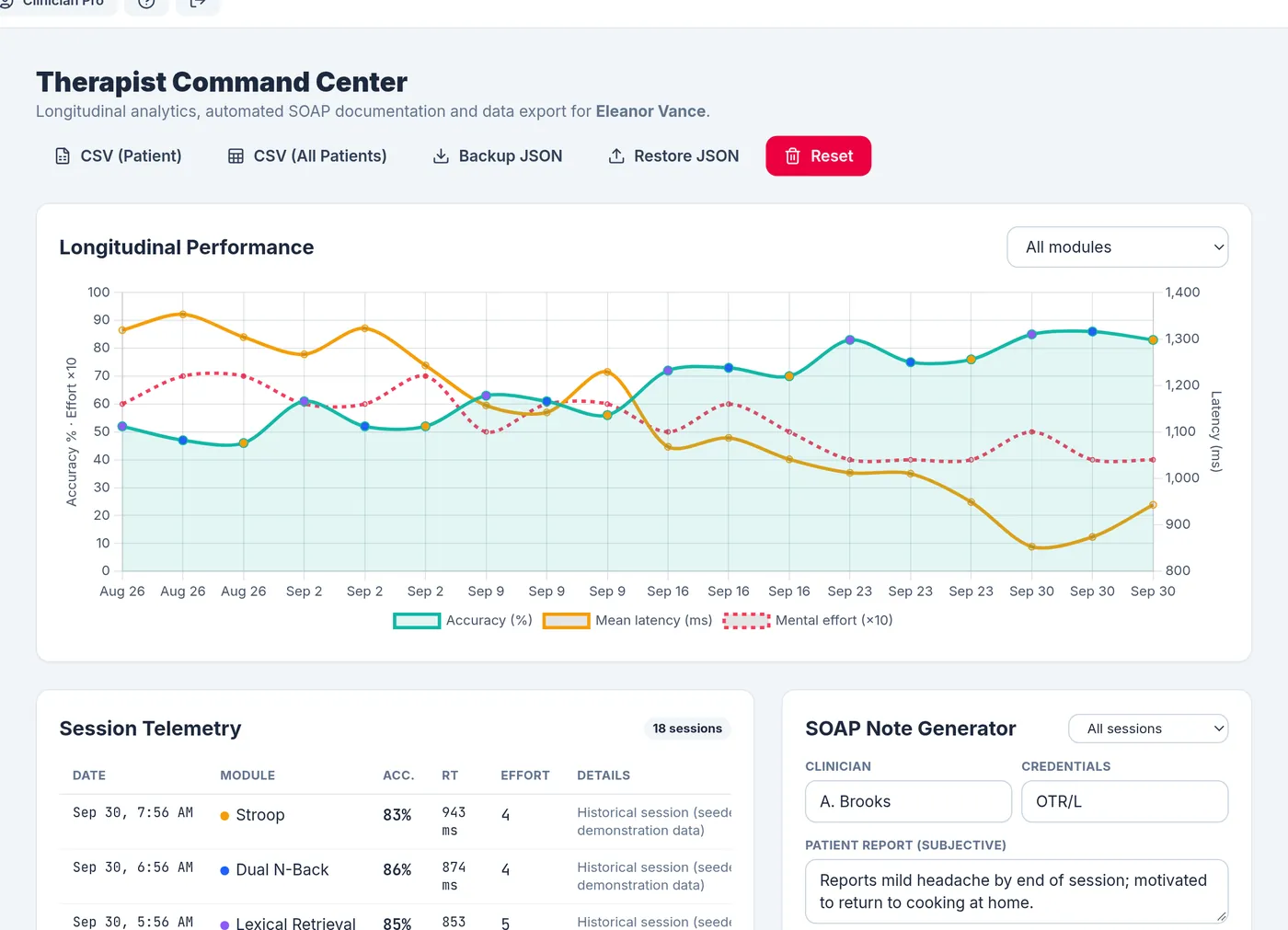
The Command Center plots accuracy, mean latency and effort for every session, and can be filtered to one module. The session table lists every record with its details, and records entered in error can be deleted.
SOAP note drafts (Clinician Pro)
The note generator builds a draft from the sessions in a chosen range (today, the last seven days or all sessions):
- S: the patient report you type in, effort ratings and breaks taken.
- O: baseline scores, then each module’s block count, mean accuracy and latency, and the most recent results.
- A: whether each module improved, declined or stayed stable against earlier sessions, strengths and weaker areas, module-specific observations (for example lateral bias or interference cost), effort, and goal status.
- P: suggested next steps based on the results, plus your clinician name and credentials.
The draft is plain text in an editable box, ready to copy or download as a .txt file. It is a starting point to review and edit, not a finished clinical record.
SMART goals (Clinician Pro)
Goals can be tracked manually, or automatically from a module: progress is the average accuracy of the last three sessions of that module against a target you set.
Export and backup
- CSV (Basic and Pro): one row per session for the current patient or all patients, with baseline scores and a JSON column of module-specific measures. Cells are protected against spreadsheet formula injection.
- Backup file (Pro): a JSON file of all your patients that can be restored in another browser.
Demo patients are never included in exports, backups or notes.